Popular Posts

Tuesday, June 28, 2011

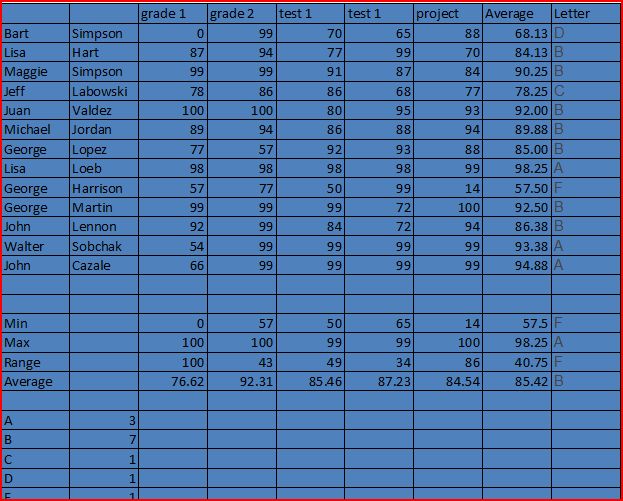
Grades 2

Excel spreadsheets are easy to create and use when you have the information and know how to setup the formulas. Teachers need this tool when computing students' grades. I just completed English 3333-01 and the professor computed my grade in the exact same format of an Excel spreadsheet as this assignment required.


 I used Excel to complete this chart. I used Google to research the different Excel functions.
The first three of the ISTE-NETS are associated with this assignment in that teachers can use digital technology to assess their students performance and also students can use this spreadsheet program to create special assignments involving formulas.

Monday, June 27, 2011

MelG's Insight Google Calendar

I like using Google Calendar to schedule all my activities and my family's activities. I have a shared calendar on my Iphone through Google where I schedule my family's activities. When my son was alive, I would use my Iphone/ Google calendar to schedule his nurses, therapists, doctor's appointments, teachers and ball games. Just click on this link: MelG's Insight Google Calendar.

All 5 of the ISTE-NETS-T standards are met when using a calendar such as Google so that teachers, students and parents can keep track of all projects and activities and share their calendars using the Internet.

Sunday, June 26, 2011

Google Forms I

Please take my Educ 2201 Survey.

Embed code for my Google Survey is:  <iframe src="https://spreadsheets.google.com/spreadsheet/embeddedform?formkey=dG5DZ1pOcmdOWWxPNzRyQm9Nbmh6N0E6MQ" width="760" height="1613" frameborder="0" marginheight="0" marginwidth="0">Loading...</iframe>

I will then post the results in a spreadsheet on Google. I have edited the survey so the questions are understandable and clear for your answers to be placed.

If I were a teacher and needed to send this survey to the parents and my co-workers, I would email it to them given their email addresses. To send it to my students, I would use Facebook or send it in a text messaging provider.

The form being published allows the results to be reported in a spreadsheet. The spreadsheet can be shared or private to certain individuals the creator chooses to view the spreadsheet. There are many different ways to view the form such as:  Google, Facebook, Text Messaging, Blogger and Email. The ways to link the form are: Facebook, Blogger, Twitter, My Space and Diigo. You do need to be a Google docs user and logged in to create the form and spreadsheet, publish them and share them. Therefore all five ISTE-NETS teaching standards are met using the public digital technology of the Internet.


The results are in this published spreadsheet.  The embed code for this is: 
It updates with every new user's results. Try this out! It was easy and cool to do.

Saturday, June 25, 2011

Shortening URL Using Tiny.cc

I've done it again Friends.
Check it out! Copy your long URL. To shorten a long URL, go to Tiny cc and paste your long URL then click on the tiny button and Tiny does the work! This tool is associated with the first three ISTE-NETS teaching standards in that students use the digital technology of the Internet to creatively shorten Internet websites for easier access and quick retrieval of information.

I then tried this infamous long URL: http://app.zoomerang.com/Create/SurveyEdit.aspx?ID=L26L2QLZGGZQ&bp=ms and Tiny shortened it to:  http://tiny.cc/nomwx  I shortened it a second time using Tiny and got:  http://tiny.cc/s0q2a  Really Cool!!

This really a good tool to show students so they can shorten their favorite links and go to them qucikly.

Friday, June 24, 2011

Reading Assignment #4 Response

Here is the link to my MML Reading Assignment #4 Response .
I used Google docs and Microsoft Word to create my answers. This assignment associates the first four standards of the ISTE-NETS in that teachers can use digital technology of computers and Internet to complete public responses to teaching issues as well as assess students' public responses to any important issue.

Wednesday, June 22, 2011

Online Graphing Tools Assignment

Hello everyone:
I have learned a new tool and want to share it with you. I learned how to create a graph and use it in a google document to show what I learned.  I charted West Virginia's 4th and 8th grade's mathematics test scores compared to the national average test scores. Here are the document links I created with the graphs inserted in them:

https://docs.google.com/document/d/1G1Gm1Rvz2gtcFRuJwSoExjVirDTp0kiMdBCyxGO5Liw/edit?hl=en_US#

https://docs.google.com/document/d/1Id6rq_G4dZ2lvAs1JG7OSBdIYT1frpEGhIbCQu4IuTo/edit#
The graphing tool I used to create the chart was Kids Zone and can be found at:
This tool associated with all 5 of the ISTE-NETS-T standards in that the digital technology of the Internet is used to locate information in a public domain and is assessed to graph that information in a readable and understandable presentation mode.

http://nces.ed.gov/nceskids/graphing/classic/

The source of data can be found at:
http://nces.ed.gov/nationsreportcard/pdf/stt2009/2010460wv4.pdf

Monday, June 20, 2011

Mel G's Insight Survey

Please take my newly created Zoomerang.com survey. Thanks
 http://app.zoomerang.com/Create/SurveyEdit.aspx?ID=L26L2QLZGGZQ&bp=ms

I found this survey tool to be extremely easy to use and adaptable for classroom projects in any subject area. I did not know this tool existed before this class and therefore I will try to incorporate a survey in any project in both Journalism and English classes I teach. I can use it to help assess my students' learning of the content in either or both classes.

This tool is associated with all 5 standards of the ISTE-NETS-T in that it uses the digital technology of the Internet to assess students' answers to simple survey questions.